You Don’t Need a GRC Platform to Get ISO 27001 Certified
Every man and his dog has a GRC tool these days. But the platform won’t do ISO 27001 for you — and if you already live in Atlassian, Jira and Confluence done well will get you further than a shiny box you’ll abandon by month nine.
The Essential 8 isn’t 8 controls. And it isn’t really a framework. Here’s what it actually is.
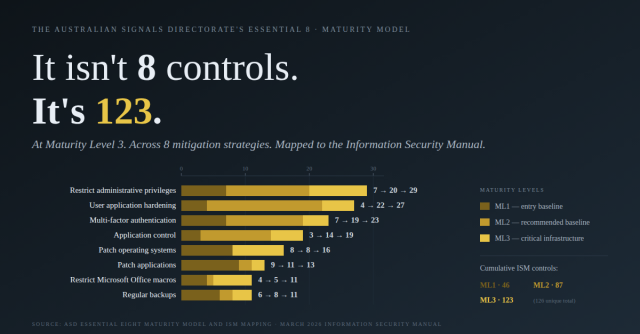
The Australian Signals Directorate’s Essential 8 is one of the most widely-referenced cyber security frameworks in the country. It’s also one of the most widely misunderstood — and the misunderstanding is causing Australian businesses to make claims, in security questionnaires and tender responses, that they can’t actually defend when asked. Two things to understand up […]
The prompt is not the problem

We are in danger of building a society full of architects with nobody left to pour the concrete. A leader opens an AI tool and types: Create a three-year digital transformation roadmap for our business. Within seconds, the model returns something polished and plausible. It has workstreams, milestones, governance, risk themes, and a neat sequence […]
GRC Software Is Powerful. It Still Needs a Pilot
For COOs and CFOs, frameworks such as ISO 27001, SOC 2, NIST CSF, the Essential Eight and CPS 234 are rarely just “security work”. They are operating model decisions. They shape how risk is owned, how evidence is produced, how third parties are governed, and how the business proves control under pressure. That is why […]
Road to 2K – (re)Starting My RowERG Journey
I purchased a Concept2 RowERG around about 2020, and it had small amounts of use here and there, before being packed away in late 2023 to clear off our patio. And it stayed in the garage for the best part of the next 2 and a half years. Cue 2026. After 3 years of personal […]
Building Trust through Transparency: How Managed Security Services Providers Can Enhance Visibility and Assurance
In the wake of high-profile breaches like the Medibank incident of 2022, trust in managed security services providers (MSSPs) has become more critical than ever. When security incidents occur and alarms go unanswered, the consequences can be severe. As a result, MSSPs must prioritise transparency and visibility to build and maintain customer trust. Why is […]
Are you reporting your poor cyber-security posture to the board? 🏢
Are you reporting your poor cyber-security posture to the board? 🏢 Why not? As a director or c-suite exec, you are obligated to ask about and identify risks to the company/organisation. How big is your risk appetite? Forbes recently posted “10 Strategies CISOs can use to improve Board Cyber Risk Reports” (link in comments) which […]
Why would I want to be a CISO in this environment?!?
⚠️ Cybersecurity friends and fellow CISOs ⚠️The SolarWinds news has been a wake-up call for many of us. It’s prompted a lot of coffee-fueled and late-night reflections. “Could that have been me?” “Am I doing enough?” “Why would I want to be a CISO in this environment?!?” In light of this, here’s where my head’s […]
Are enterprise architects the new platform team leaders?
Really interesting view point; building platforms and services (platform engineering) is being recognised in the same sentence as enterprise architecture. All shapes of architects today should be aware of their responsibility in integrating solutions with the rest of the enterprise, and not just to deliver singular systems in isolation. “Shifting the mindset from a singular […]
Coffee, and how I find great coffee experiences with brewstr
Back in 2011, I was working in Melbourne, flying in/out from my home town every week, for about 3 years, until late 2014. I was subjected to coffee snobbery in its finest. Melbourne, in case you didn’t know, has peak coffee culture; you get coffee wrong in Melbourne and people will literally fight you (exaggeration). […]